Saturday, 18 September 2010

Engine Update: Sketching in 3D


Over the past 2 months I haven't posted a lot of news. With the new project up and running (kick-off was the 13th) I'll start doing more regular postings like I used to.

With the project details still being worked on, there is some time to develop tools that should make life easier later on in the development stage. So I decided to work on some odd ideas that I came up with while traveling. The first one is a pretty cool feature, its sketching in 3d. It uses the 3d meshes inside the level as a canvas to draw on. I think this is very useful for level designers and to help process play-testing feedback.


For this particular feature to work, triangle precision ray-testing was required. Luckily the XNA Creators Club had a sample project to get me started. The lines are made of vertices combined into a LineStrip. In addition the triangle normal is tested against the ray direction to prevent drawing on back-faced triangles.

While implementing triangle-precision picking I updated the Gizmo so it is now able to select models by triangle instead of the small boundingbox. Being used to 3D studio max' selection methods I decided to implement multi-layer selection. Because that name probably makes no sense, I'll try to explain it. If multiple objects are behind one another, clicking multiple times will select the object behind the previously selected object, clicking again will select the one behind it etc. That means you can select any object even if another is blocking your view.

Each click will pass through another "layer" and select the object occluded by the one in front.

Tuesday, 7 September 2010

Level & Content management [Part 3]

I got a question about my level and object management recently and was asked if I could talk about it. So in this post I'll explain my old and current method of dealing with (level) serialization and how I combined it with my game editor.

A few months ago I created my levels using a hybrid implementation of a level editor and code to create and connect objects. A game would have several "Scene" classes to be filled with Entities and later set at the correct position in 3D space using the level editor. This worked pretty well, especially since our team had limited time to work on our projects (8 weeks) so I wasn't able to create a fully featured editor at the time. One advantage was the ease of setting up connections and events between objects in a level, because everything is available in the Scene class. An obvious disadvantage was the inability of adding objects on the fly (in runtime) it required some planning to work efficiently. With the game Needle Juice there was only a limited about of objects that required the use of the editor, so again, a fully featured editor wasn't necessary.

However, after completing Over Night I set aside some time to work on a more complex editor to aid in the upcoming project(s). This meant a new way of serializing the Scene to store any data. This new method will be explained below, with some code snippets. On a side-note I strongly recommend looking at existing editors (like UDK) Fool around with it, learn its basics and see what fits your needs and what doesn't. I occasionally opened up an existing Unreal Tournament 3 map and messed around with it to hunt for new features. If you're the only developer to use that tool you can mold it to your exact specifications and preferences very easily.

Before I go on, the following is in no way the only or the best way of doing it. It worked for me and should be easy to implement for yourself. It will hopefully give you a clear idea of you can combine your own requirements with the examples shown.

First off, any object that exists in my level is an ISceneEntity (interface) with a Position, Rotation, Scale etc. The interface holds data that is necessary for any object in the world. Any class that derives from this interface or any other subclass may have its own properties that need to be serialized as well. That means a flexible serializer is required. Luckily Shawn was so kind to explain everything you ever wanted to know about IntermediateSerializer. I recommend you read through his article.

To store all data in your level your engine needs to know what to serialize and what to ignore. I use a fairly simple Level class to keep track of any objects currently in the world (and part of the serialization list) You add your Entity to a List in your Level class. The IntermediateSerializer will go through the list and store all Entities in an Xml level file.
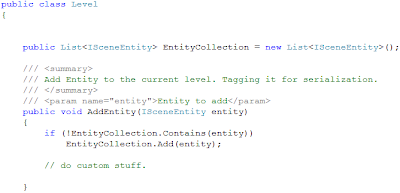
To actually store your level you need to call the IntermediateSerializer.Serialize() to write all of the level data to your disk.
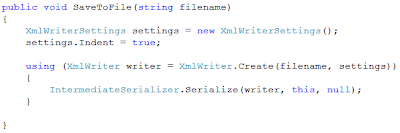
The above method is part of the Level.cs class.

If you're following along, don't forget to add the Microsoft.Xna.Framework.Content reference to your project folder. By default its already part of your Content project, when referencing in code, you need to add it to your game project as well. The IntermediateSerializer class is part of the Microsoft.Xna.Framework.Content.Pipeline.Serialization.Intermediate namespace.

Your level is now stored on disk. Some class will require setting some Attributes in order to be stored properly. Use the [ContentSerializerIgnore] Attribute over any public property that you want excluded. Use the [ContentSerializer] Attribute to include private or protected variables.
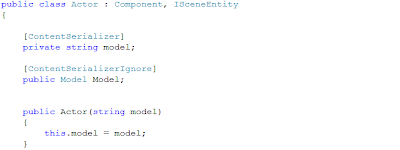
Finally to load all of your previously stored data you need to call IntermediateSerializer.Deserialize(). For more info I recommend reading through some of Shawn's articles about it.

I was going to talk about a new feature (mentioned in my previous post) that allows preloading of assets, reducing overall idle-time. This post is already long enough so I'll keep it in mind for some other time.

I hope this helps anyone looking to create his own editor. Level serialization isn't a complex operation, the most important thing is properly structured component system. If you have any questions you can post your comments in the comment section below.

Sunday, 29 August 2010

Engine Update: New Features & Tools!

It's been a while since my last post. That means I had a lot of time to add new features and spend more time on existing features as well. I'd like to include them in a video soon, for now I'll do a quick rundown of the most important new additions to the engine.

Preloading of Assets
Load Models, Textures, Video, SoundEffects in the background (Separate Thread) before the complete level is setup. The engine reads part of the level file and pulls out all the required assets for the upcoming level and load them before the game initiates a level transition.


Undo/Redo system
I Finally took the time to integrate this into the editor. For now it works primarily on SceneEntities (anything part of the level) and can undo translation/rotation/scale.


System messages
The system will "ping" important messages and warnings to the top-left corner of the screen, warning you of possible errors. (See above)

Game Properties Window
Allows you to set Engine properties as well as user-defined game properties, very useful when debugging.


3D Text Buttons
Selectable by mouse, useful for either ingame activators or 3D menus. Text is baked into a texture at runtime and stored on disk.


Improved Object placement
It's now possible to add objects using the Quick-menu (right-click popup) objects will be placed on the position the mouse is pointing in 3D.

Maya style navigation/orbit camera
Holding down "L"-key will orbit the currently selected object, scroll-wheel will zoom in/out.

VisualScript & AnimationEditor improvements
Added a lot of new Node-types and added the ability to directly add an animation to a new script.


Material editing inside VisualScript
All (Sunburn) material effects are stored and can be accessed using Script Nodes. Useful to dynamically set textures and other shader properties etc.

File browsing inside VisualScript
to easily attach files (Textures, Models, Levels etc.) to a Script Node.


I consider these the most significant changes/additions to the engine. Other things will show up in the next video.

Soon a new project will launch, lasting 4 months in total (instead of the previous 8 weeks we were given when building OverNight & Needle Juice) It's targeted towards XBLIG (Xbox Live Indie) and should be the first game to be fully developed (previous projects were prototypes, not full games) and released on that channel. I'm looking forward to get started, and will of course update on the progression of the game...

Wednesday, 28 July 2010

Engine Update: Shaders & Editor Additions

It has been a while since my last update. The image below shows some of the things I've worked on these past few days...


So what's new? First off, the shaders might have caught your attention, the lava is flowing and the arrows are flashing which you can't see in the still image unfortunately, I'll make sure to include them in the next video. They were really just experiments to get some practice with shaders and was hoping to use it for a material editor I was working on (had to put it on hold for now) Still, I think they look pretty cool (especially when you see them in motion)

The next thing you can see on the image is the ContextMenu (pop-up menu that appears when you right-click) Its part of the Editor and is rendered inside of the XNA Game window. XNA is still running as it is used to, winforms is added to the XNA window not the other way around.
As you can see there are several useful options inside this pop-up window. You can quickly add new Entities, add selected entities to your current script and continue playing or restart the level using the changes you made in edit-mode.

Hopefully I'm able create another video soon, showcasing some other additions that were added over the past couple of weeks. In the meanwhile I'm working on a game prototype, this directly aids in build the engine as well...

Sunday, 11 July 2010

Core Engine: Creating a simple level (Video)

I'm back with another video, this time I'll show you the creation of a (very) simple level. With The purpose of demonstrating some of the new additions, including the Animation Editor and the updated Visual Scripter. The video playback speed is set to x2 to reduce the overall length. Hopefully you'll enjoy watching and get a bit of insight in the engine's development capabilities.


The menu system shown in the video above is a WIP, originally all level objects were added at build-time. It's a big change in overall engine design to get these things working flawlessly with the new system. The core is aimed at rapid development and tweaking of the game/level while playing. It's been like that since day one and the new system should compliment that, increasing flexibility of the engine and speeding up the overall process of creating games.

Thursday, 8 July 2010

Visual Scripting Editor (Video)

It's 6:45 in the morning and the scripting editor is finally ready for a short demonstration. Spend most of the time cleaning up the node-system and made it a LOT easier to add additional node types in the future. The scripts are now directly stored inside the level file and can be stored separately if desired (for re-use in other levels)

In the video you will see two simple scripts, one animating a box and the other toggling a point light on and off. You'll also see the new Level Manager window, more on that later.


(Watch in HD & Fullscreen!)

Monday, 5 July 2010

Scripting for Artists (and programmers)

My last entry was over a week ago, but I've been very busy with C# nonetheless. The most interesting (to me at least...) is a visual scripter I've worked on for the past 4 days. It's supposed to work very similar to UE3/UDK's "Kismet". If you don't know what Kismet is, don't worry it is explained a little further in this entry. Although the visual scripter or artist-scripter (as it would be most useful to non-programmers) is not the only thing I've worked on (Animation Editor is another thing that is currently WIP), but I'll only talk about scripting for now.

The past couple of days I used MEL (scripting in maya) Unity Scripting and Dragon Age scripting. They all are terrible to get into. They are probably great if you spend a lot of time learning them, but I usually spend only a very limited about of time on any of those scripting languages. Now for "us" programmers it's not that hard to learn a scripting language if you take the time, but for artists and level designers whom only occasionally need to write a script it's very helpful to have a tool like Kismet. See below...

Example script made in Kismet.

Kismet is not designed to replace the regular scripting language in UE3...it's a tool to help create simple (and sometimes more complex) scripts for level specific behavior. The more complex and game wide scripting can only be done with the regular scripting language. Even though I'm a programmer and can probably live without this tool, I still decided to create something similar, as a challenge, a cool new feature and because it could prove to be very useful when working on our next game...

So far, the basic system is in place and working properly. I hadn't really worked with Winforms nor Event driven programming before, so this was a great way to get into that.

My own visual scripter implementation (visually still very unpolished)

Progress so far: A new script can be created at runtime, nodes can be dragged around, connections between nodes can be created and the whole script can be saved and reloaded to and from the hard drive. A few simple scripts have been created so far (ea. playing an elevator animation when the player enters a volume)

Similar to Kismet, you can load an animation file (previously created in the Animation Editor, more on that later) and play it when the assigned trigger is fired (Can be something like a level has completed loading or the player entered a trigger volume).

I should be able to demonstrate all this in a video shortly, first I'll continue working on essential usability features...
Be sure to keep an eye on my YouTube Channel if you'd like to get an early glimpse of the Scripter in action (I'll upload a video as soon as I feel it's ready to be recorded)